Website Troubleshooting
Your Contractor Website Gets Traffic but No Leads: What to Check
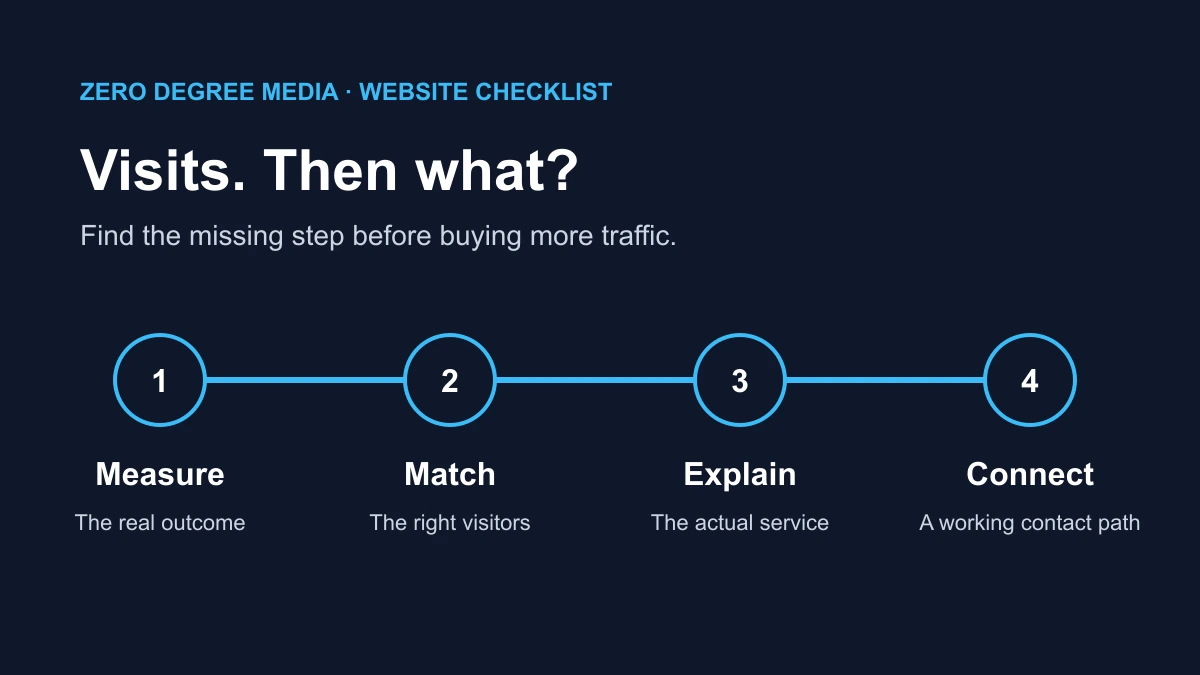
If your contractor website gets traffic but no leads, check four things in order: whether inquiries are being measured and delivered, whether the visitors need your services, whether the page answers their questions, and whether contacting you works on a phone. Buying more visits before checking that path can make a small problem more expensive.
This guide is for the owner who can see visits in an analytics report but cannot connect them to estimate requests. It is a diagnostic process, not a promise that a particular layout will produce a set number of jobs.
First, define what a lead means for your business
A visitor, a contact-button click, a submitted form, a qualified inquiry and a booked job are different events. Write down the outcome you actually need. For a remodeler, that might be a homeowner in the service area asking about a project the company handles. For a plumbing company, it might be a call that reaches the person who can arrange service.
Keep a simple inquiry log alongside your website report. Record the date, how the person contacted you, the service requested, the general service area and whether you could take the work. Avoid putting private customer details into analytics events.
This separates two situations that look identical in a dashboard: the site produced no inquiries, or the site produced inquiries that were missed, lost or outside your scope. Each needs a different repair.
Check the contact path before the traffic report
Open the site on your own phone and follow the same path as a homeowner. Start on an important service page rather than only the homepage. Can you identify the service, see the area covered and find a clear next step without opening several menus?
Check the phone number displayed on the page against the number the phone button actually dials. A button can look correct while its underlying link points to an old number. Try the contact page, header, sticky mobile button and footer; they may have been built separately.
Then test the form with a clearly labeled test inquiry and confirm that it arrives at the intended destination. Check the inbox, spam folder and any form dashboard. A friendly success message is not delivery evidence. Have the website provider investigate if the interface reports success but nothing arrives. Do not submit repeated tests that trigger duplicate jobs or real bookings.
Make sure analytics records the outcome you care about
Google Analytics can record activity without confirming that a useful inquiry reached you. Google’s enhanced measurement documentation lists events such as form interactions. Check your own implementation rather than assuming every form or phone link is covered.
Ask your provider to distinguish these actions in the report:
- Someone selected a phone or email link.
- Someone tried to submit the form.
- The server accepted a valid inquiry.
- The inquiry reached the destination used by your business.
The last step may require delivery records outside Analytics. Even a successfully delivered form is not automatically a qualified lead. A sales pitch, wrong-area request or spam message should not be counted as the same outcome as a suitable estimate request.
Use Analytics DebugView to inspect test events with your provider. Keep that testing separate from claims about real customer demand. If tracking was missing last month, you cannot reconstruct exact past inquiry counts merely by installing it today.
Find out which pages and searches bring the visits
The total traffic number is a starting point. It does not tell you whether people landed on the right page with the right need.
In Google Search Console, review the Performance report by query and page. Look for whether searches relate to the services you want to sell. A useful how-to article can attract readers who want instructions rather than a contractor. That article may still help the site, but it should not be judged as if every reader were requesting an estimate.
Search Console describes visibility and clicks in Google Search; Analytics describes activity on your website and traffic from multiple sources. Google’s guide to using the two together explains why their figures do not match exactly. Do not treat a Search Console click and an Analytics session as interchangeable counts.
In Analytics, compare landing pages and traffic sources over the same complete period. Separate traffic to service pages from informational articles, careers pages and unrelated referral visits. If you run ads, confirm that the advertised service and location match the page people reach.
For example, a hypothetical visitor who clicks an ad for deck repair and lands on a generic home-improvement page has to work out whether repair is offered at all. Sending that visitor to an accurate repair page addresses a clearer problem than changing the homepage button color.
Give the service page enough information to support a decision
A service page should help someone decide whether to contact you. It should state what you do, what you do not handle when that distinction matters, where you work and what happens after an inquiry.
Use this checklist on the page that gets relevant visits:
- Service: Can a homeowner tell which work the page describes?
- Area: Is the actual service area clear without an unsupported “everywhere” claim?
- Evidence: Are there relevant real project photos with accurate captions?
- Process: Does the visitor know what information to send and what the next step is?
- Contact: Is there an obvious way to ask about that work?
Replace vague slogans with useful answers. “Quality craftsmanship” says less than explaining whether your company builds new decks, repairs existing structures or does both. Show only work you can accurately attribute to your business. A stock photograph does not become a completed local project because it appears on your website.
Our contractor website examples show how different service businesses organize their information. Use examples to clarify your own scope; do not copy another company’s promises or project claims.
Remove friction from the mobile inquiry
A contact form needs enough information to route the request. It does not need to collect every detail required for the final estimate on the first screen. Review each required field and ask what decision it supports now.
Keep labels visible, explain required fields and show an understandable error when something is missing. Preserve the information already entered after an error. If photos are optional, say so. If an upload fails, give the visitor a workable alternative instead of trapping the inquiry behind it.
Try the form with a phone keyboard open and check whether a sticky button covers a field or the submit control. Test a slow connection and a normal portrait screen. Google’s Core Web Vitals guidance explains loading, interaction and visual stability measurements; those measurements help investigate usability, but a performance score alone does not explain why a particular person did not inquire.
Make the next step accurate. If the button sends a request for follow-up, call it an estimate request. Do not label it “Book now” unless it actually books an appointment.
Check what happens after an inquiry arrives
If the test reaches the right inbox, check who monitors it and what happens next. A form can work correctly while requests sit in an account nobody checks. A phone link can dial the right number while the voicemail greeting is outdated or the mailbox is full.
Choose a clear owner for website inquiries and keep the stated contact process accurate. If a page promises a particular response window, make sure the business can meet it. Track whether suitable requests receive a reply, without turning every automated acknowledgement into evidence that a real conversation happened.
Match the repair to the finding
If the phone number is wrong or the form does not deliver, fix that first and repeat the test. If relevant visitors reach an unclear service page, improve the explanation and contact path. If most visitors are looking for information or a service you do not offer, address the traffic and landing-page mismatch.
Change one meaningful part of the path at a time when practical. Record what changed and when, then compare consistent periods using the same lead definition. For a site with few inquiries, a quiet week is not enough evidence to declare a new layout a success or failure. Seasonality, ad changes and available capacity can affect the comparison too.
Send your website provider the affected page, the traffic source you are concerned about, the dates reviewed and the result of your contact-path test. That gives them something concrete to diagnose.
If the issue is that people cannot find the site at all, start with our Google visibility checklist. If the site is getting relevant visits and you need help checking what happens next, request a website audit. Our contractor website service explains the scope when a broader website change is appropriate.